Java日期最常见的8个坑
前言
今天我想和大家聊聊日期处理这个话题。
日期处理看似简单,实则是开发中最容易出错的领域之一。
有些小伙伴在工作中可能遇到过这样的场景:测试环境好好的,一上线就出现日期计算错误;或者用户反馈说跨时区的时间显示不对。
这些问题往往都是因为日期处理中的一些坑导致的。
今天就跟大家一起聊聊日期处理最常见的8个坑,希望对你会有所帮助。
1. 时区坑:你以为的GMT不是你以为的
有些小伙伴在工作中可能遇到过这样的问题:明明程序里设置的是GMT时区,怎么时间还是不对?
问题重现
public class TimeZoneTrap {
    public static void main(String[] args) {
        // 坑1:误以为Date有时区概念
        Date date = new Date();
        System.out.println("Date toString: " + date);
        // 输出:Thu Sep 21 15:30:00 CST 2023
        // 注意:Date对象内部存储的是UTC时间戳,toString时使用JVM默认时区格式化

        // 坑2:SimpleDateFormat的时区陷阱
        SimpleDateFormat sdf = new SimpleDateFormat("yyyy-MM-dd HH:mm:ss");
        System.out.println("Default timezone format: " + sdf.format(date));

        // 修改时区为GMT
        sdf.setTimeZone(TimeZone.getTimeZone("GMT"));
        System.out.println("GMT format: " + sdf.format(date));

        // 坑3:不同时区的同一时间戳
        long timestamp = date.getTime();
        System.out.println("Timestamp: " + timestamp);

        // 用不同时区解析同一个时间戳
        sdf.setTimeZone(TimeZone.getTimeZone("America/New_York"));
        System.out.println("New York time: " + sdf.format(new Date(timestamp)));

        sdf.setTimeZone(TimeZone.getTimeZone("Asia/Shanghai"));
        System.out.println("Shanghai time: " + sdf.format(new Date(timestamp)));
    }
}
深度分析
Date对象的本质:
Date内部只存储一个long型的时间戳(1970-01-01 00:00:00 GMT以来的毫秒数)- 它没有时区概念,时区是在格式化和解析时应用的
toString()方法使用JVM默认时区
时区标识的坑:
// 常见的错误时区写法
TimeZone.getTimeZone("GMT");      // ✅ 正确
TimeZone.getTimeZone("UTC");      // ✅ 正确
TimeZone.getTimeZone("GMT+8");    // ⚠️ 不推荐,有些JDK版本可能不识别
TimeZone.getTimeZone("UTC+8");    // ⚠️ 错误!UTC没有时区偏移

// 推荐使用时区ID
TimeZone.getTimeZone("Asia/Shanghai");    // ✅ 推荐
TimeZone.getTimeZone("America/New_York"); // ✅ 推荐
解决方案
public class TimeZoneSolution {
    public static void main(String[] args) {
        // 解决方案1:明确指定时区
        String timezone = "Asia/Shanghai";
        SimpleDateFormat sdf = new SimpleDateFormat("yyyy-MM-dd HH:mm:ss");
        sdf.setTimeZone(TimeZone.getTimeZone(timezone));

        // 解决方案2:使用Java 8的ZonedDateTime
        ZonedDateTime zonedDateTime = ZonedDateTime.now(ZoneId.of("Asia/Shanghai"));
        System.out.println("ZonedDateTime: " + zonedDateTime);

        // 解决方案3:存储时区信息
        record TimestampWithTimezone(long timestamp, String timezoneId) {
            public String format() {
                SimpleDateFormat sdf = new SimpleDateFormat("yyyy-MM-dd HH:mm:ss");
                sdf.setTimeZone(TimeZone.getTimeZone(timezoneId));
                return sdf.format(new Date(timestamp));
            }
        }
    }
}
2. 夏令时坑:一小时消失了
有些小伙伴在处理跨时区的时间计算时,可能遇到过”时间消失”的灵异事件。
问题重现
public class DaylightSavingTrap {
    public static void main(String[] args) throws ParseException {
        // 美国纽约时区,2023-03-12 01:59:59 后直接跳到 03:00:00
        SimpleDateFormat sdf = new SimpleDateFormat("yyyy-MM-dd HH:mm:ss");
        sdf.setTimeZone(TimeZone.getTimeZone("America/New_York"));

        // 测试不存在的时刻
        String nonExistentTime = "2023-03-12 02:30:00";
        try {
            Date date = sdf.parse(nonExistentTime);
            System.out.println("Parsed: " + sdf.format(date));
        } catch (ParseException e) {
            System.out.println("Error: " + e.getMessage());
            // 输出:Unparseable date: "2023-03-12 02:30:00"
        }

        // 测试重复的时刻(秋季)
        sdf.setLenient(false); // 严格模式
        String ambiguousTime = "2023-11-05 01:30:00"; // 这个时刻可能出现两次
        Date date = sdf.parse(ambiguousTime);
        System.out.println("Ambiguous time parsed: " + sdf.format(date));
        // 问题:这个时间点对应哪个?是夏令时还是标准时间?
    }
}
深度分析
夏令时的规则:
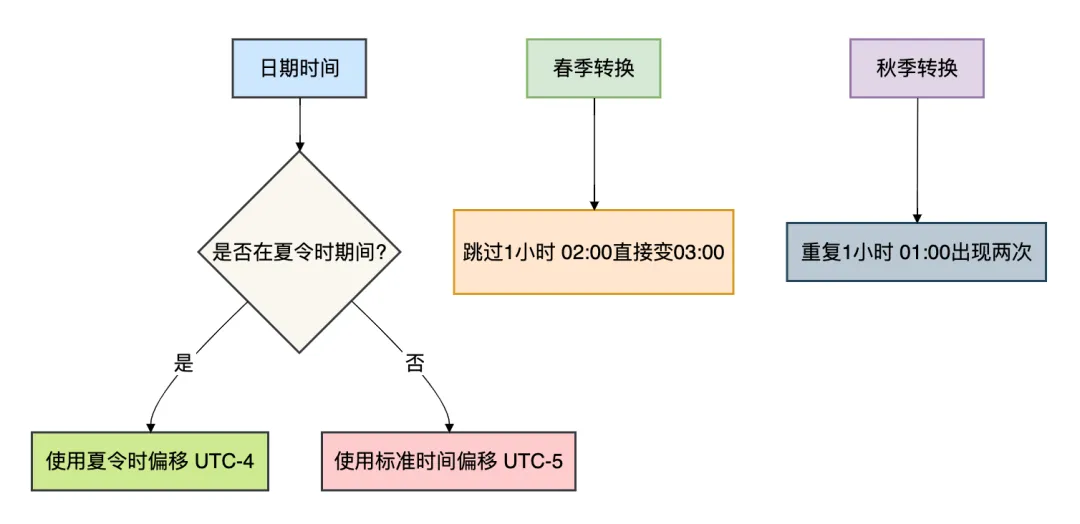
影响范围:
- 时间计算:加24小时不一定得到明天的同一时刻
- 数据库存储:需要明确存储的时区信息
- 定时任务:可能在不存在的时间点执行失败
解决方案
public class DaylightSavingSolution {
    public static void main(String[] args) {
        // 使用Java 8的日期时间API处理夏令时
        ZoneId newYorkZone = ZoneId.of("America/New_York");

        // 处理不存在的时刻
        LocalDateTime nonExistent = LocalDateTime.of(2023, 3, 12, 2, 30);
        try {
            ZonedDateTime zdt = nonExistent.atZone(newYorkZone);
            System.out.println("ZonedDateTime: " + zdt);
        } catch (DateTimeException e) {
            System.out.println("Invalid time in timezone: " + e.getMessage());
            // 使用调整策略
            ZonedDateTime adjusted = ZonedDateTime.of(nonExistent, newYorkZone).withLaterOffsetAtOverlap();
            System.out.println("Adjusted: " + adjusted);
        }

        // 处理重复的时刻
        LocalDateTime ambiguous = LocalDateTime.of(2023, 11, 5, 1, 30);
        ZonedDateTime firstOccurrence = ambiguous.atZone(newYorkZone).withEarlierOffsetAtOverlap();
        ZonedDateTime secondOccurrence = ambiguous.atZone(newYorkZone).withLaterOffsetAtOverlap();
        System.out.println("First occurrence: " + firstOccurrence);
        System.out.println("Second occurrence: " + secondOccurrence);
    }
}
3. 闰秒坑:多出来的那一秒
有些小伙伴可能不知道,除了闰年,还有闰秒的存在。
问题分析
public class LeapSecondTrap {
    public static void main(String[] args) {
        // Java标准库不直接支持闰秒
        // 但是会影响时间戳计算

        // 示例:2016-12-31 23:59:60 是一个闰秒
        // 这个时间在Java中无法直接表示

        // 测试时间差计算
        Instant beforeLeapSecond = Instant.parse("2016-12-31T23:59:59Z");
        Instant afterLeapSecond = Instant.parse("2017-01-01T00:00:00Z");

        long secondsDiff = Duration.between(beforeLeapSecond, afterLeapSecond).getSeconds();
        System.out.println("Seconds between: " + secondsDiff); // 输出:1
        // 但实际上中间经过了2秒(包含闰秒)
    }
}
深度分析
闰秒的影响:
- 时间戳计算:POSIX时间戳忽略闰秒
- 系统时间:操作系统可能需要特殊处理
- 高精度计时:影响纳秒级的时间计算
解决方案
public class LeapSecondSolution {
    // 对于大多数应用,忽略闰秒的影响
    // 对于需要高精度时间同步的应用(金融交易、科学计算)

    public static void main(String[] args) {
        // 解决方案1:使用TAI时间(国际原子时)
        // Java不支持,需要使用专门的库

        // 解决方案2:记录时间偏移
        record TimestampWithLeapSecond(long posixTimestamp, int leapSecondOffset) {
            public long getAdjustedTimestamp() {
                return posixTimestamp + leapSecondOffset;
            }
        }

        // 解决方案3:对于普通业务,使用NTP同步
        System.out.println("普通业务建议:使用NTP时间同步,接受闰秒调整");
    }
}
4. 日期格式坑:YYYY还是yyyy?
有些小伙伴在写日期格式化时,可能没注意到大小写的区别。
问题重现
public class DateFormatTrap {
    public static void main(String[] args) throws ParseException {
        // 坑:YYYY vs yyyy
        SimpleDateFormat sdf1 = new SimpleDateFormat("YYYY-MM-dd");
        SimpleDateFormat sdf2 = new SimpleDateFormat("yyyy-MM-dd");

        // 测试跨年的日期
        Date date = new GregorianCalendar(2023, Calendar.DECEMBER, 31).getTime();

        System.out.println("YYYY format: " + sdf1.format(date)); // 输出:2024-12-31
        System.out.println("yyyy format: " + sdf2.format(date)); // 输出:2023-12-31

        // 为什么?YYYY是"week year",基于周计算
        // 2023-12-31是周日,属于2024年的第一周

        // 坑2:MM vs mm
        SimpleDateFormat sdf3 = new SimpleDateFormat("yyyy-MM-dd HH:mm:ss");
        SimpleDateFormat sdf4 = new SimpleDateFormat("yyyy-MM-dd HH:MM:ss"); // 错误的分钟占位符

        System.out.println("Correct minutes: " + sdf3.format(date));
        System.out.println("Wrong minutes (MM): " + sdf4.format(date));
        // MM是月份,mm是分钟,这里会显示月份值作为分钟
    }
}
深度分析
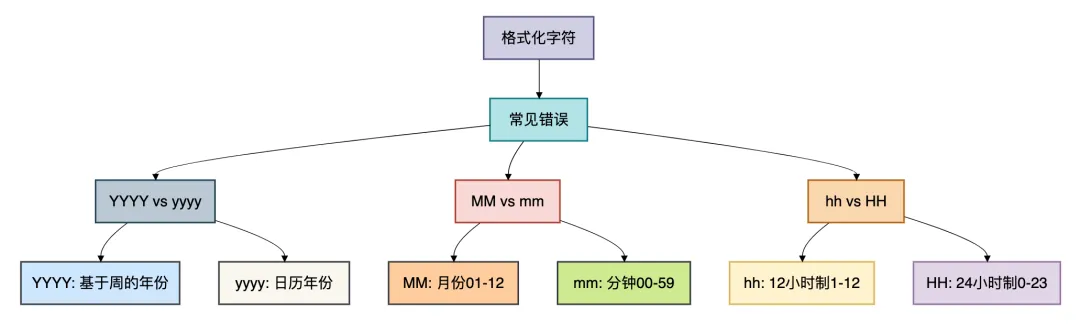
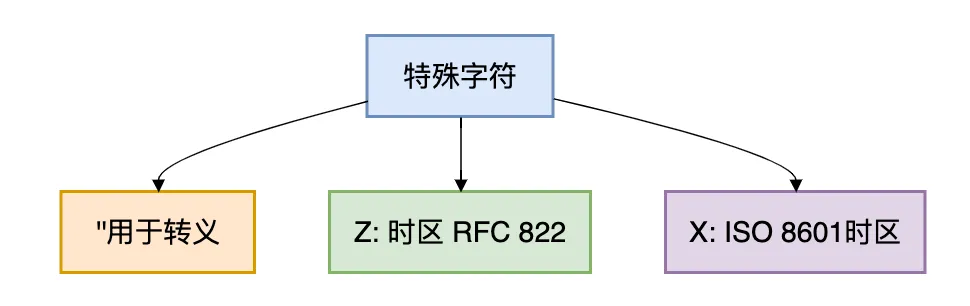
解决方案
public class DateFormatSolution {
    public static void main(String[] args) {
        // 解决方案1:使用明确的常量
        System.out.println("推荐格式模式:");
        System.out.println("年: yyyy (日历年) 或 YYYY (周年) - 根据业务需求选择");
        System.out.println("月: MM");
        System.out.println("日: dd");
        System.out.println("时: HH (24小时制) 或 hh (12小时制)");
        System.out.println("分: mm");
        System.out.println("秒: ss");
        System.out.println("毫秒: SSS");

        // 解决方案2:使用预定义格式
        SimpleDateFormat isoFormat = new SimpleDateFormat("yyyy-MM-dd'T'HH:mm:ss'Z'");
        isoFormat.setTimeZone(TimeZone.getTimeZone("UTC"));

        // 解决方案3:使用Java 8的DateTimeFormatter
        DateTimeFormatter formatter = DateTimeFormatter.ofPattern("yyyy-MM-dd HH:mm:ss");
        String formatted = LocalDateTime.now().format(formatter);
        System.out.println("Java 8 format: " + formatted);

        // 解决方案4:单元测试验证格式
        testDateFormatPatterns();
    }

    private static void testDateFormatPatterns() {
        // 验证各种格式
        Map<String, String> testPatterns = Map.of(
            "yyyy-MM-dd", "2023-12-31",
            "YYYY-MM-dd", "2024-12-31", // 注意差异
            "yyyy/MM/dd HH:mm:ss", "2023/12/31 23:59:59",
            "yyyy-MM-dd'T'HH:mm:ss.SSS'Z'", "2023-12-31T23:59:59.999Z"
        );


    }
}
5. 日期计算坑:一个月有多少天?
有些小伙伴在做日期计算时,可能简单粗暴地认为每月都是30天。
问题重现
public class DateCalculationTrap {
    public static void main(String[] args) {
        // 坑1:直接加30天不等于加一个月
        Calendar cal = Calendar.getInstance();
        cal.set(2023, Calendar.JANUARY, 31);

        System.out.println("原始日期: " + cal.getTime());

        // 加一个月
        cal.add(Calendar.MONTH, 1);
        System.out.println("加一个月后: " + cal.getTime());
        // 输出:2023-02-28(2月没有31号,自动调整)

        // 坑2:加30天
        cal.set(2023, Calendar.JANUARY, 31);
        cal.add(Calendar.DAY_OF_MONTH, 30);
        System.out.println("加30天后: " + cal.getTime());
        // 输出:2023-03-02(不是2月)

        // 坑3:月份从0开始
        SimpleDateFormat sdf = new SimpleDateFormat("yyyy-MM-dd");
        Date date;
        try {
            date = sdf.parse("2023-00-01"); // 月份0?实际上解析为2022-12-01
            System.out.println("月份0解析为: " + sdf.format(date));
        } catch (ParseException e) {
            e.printStackTrace();
        }
    }
}
深度分析
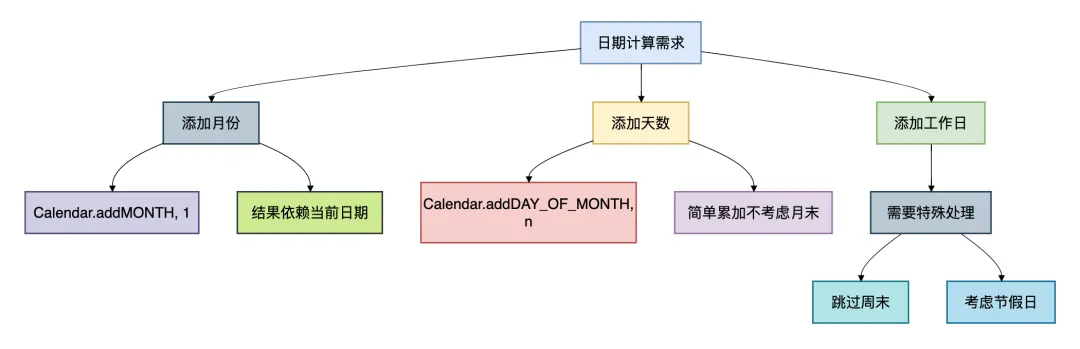
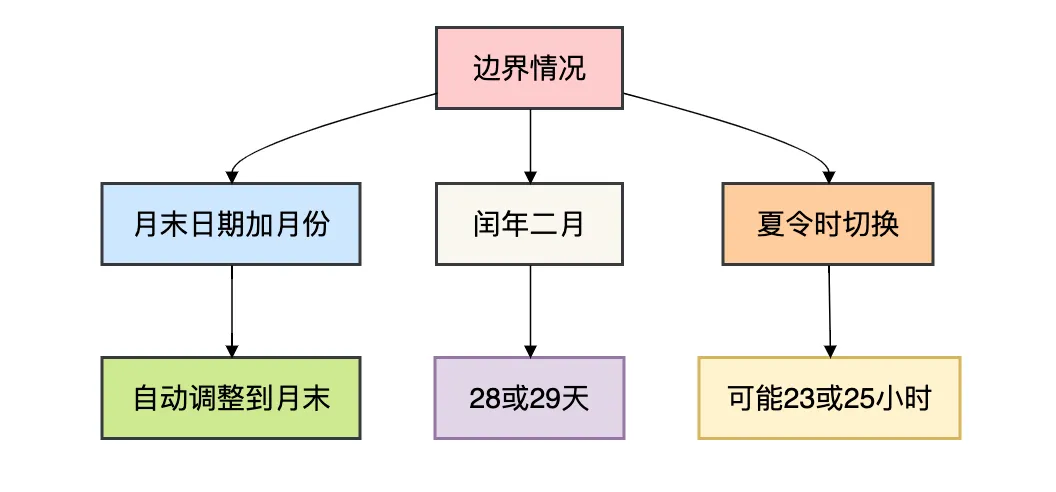
解决方案
public class DateCalculationSolution {
    public static void main(String[] args) {
        // 解决方案1:使用Java 8的日期API
        LocalDate date = LocalDate.of(2023, 1, 31);

        // 加一个月,自动处理月末
        LocalDate nextMonth = date.plusMonths(1);
        System.out.println("Java 8 加一个月: " + nextMonth); // 2023-02-28

        // 加30天
        LocalDate plus30Days = date.plusDays(30);
        System.out.println("Java 8 加30天: " + plus30Days); // 2023-03-02

        // 解决方案2:明确业务规则
        System.out.println("\n不同业务场景的日期计算规则:");
        System.out.println("1. 金融计息:按实际天数计算");
        System.out.println("2. 订阅服务:每月固定日期,遇周末提前");
        System.out.println("3. 项目计划:只计算工作日");

        // 解决方案3:工作日计算
        LocalDate startDate = LocalDate.of(2023, 9, 1);
        long workingDays = calculateWorkingDays(startDate, 10);
        System.out.println("10个工作日后的日期: " +
            startDate.plusDays(workingDays));
    }

    private static long calculateWorkingDays(LocalDate start, int workingDaysNeeded) {
        long days = 0;
        LocalDate current = start;

        while (workingDaysNeeded > 0) {
            current = current.plusDays(1);
            // 跳过周末
            if (!isWeekend(current)) {
                workingDaysNeeded--;
            }
            days++;
        }
        return days;
    }

    private static boolean isWeekend(LocalDate date) {
        DayOfWeek day = date.getDayOfWeek();
        return day == DayOfWeek.SATURDAY || day == DayOfWeek.SUNDAY;
    }
}
6. 日期比较坑:忽略时间部分
有些小伙伴在比较日期时,可能会忽略时间部分。
问题重现
public class DateComparisonTrap {
    public static void main(String[] args) throws ParseException {
        SimpleDateFormat sdf = new SimpleDateFormat("yyyy-MM-dd HH:mm:ss");

        // 两个不同的时间,但是同一天
        Date date1 = sdf.parse("2023-09-21 23:59:59");
        Date date2 = sdf.parse("2023-09-21 00:00:01");

        // 坑:直接比较Date对象
        System.out.println("date1.equals(date2): " + date1.equals(date2)); // false
        System.out.println("date1.compareTo(date2): " + date1.compareTo(date2)); // > 0

        // 坑:只想比较日期部分
        Calendar cal1 = Calendar.getInstance();
        cal1.setTime(date1);
        Calendar cal2 = Calendar.getInstance();
        cal2.setTime(date2);

        // 错误的比较方法
        boolean sameDay = cal1.get(Calendar.YEAR) == cal2.get(Calendar.YEAR) &&
                         cal1.get(Calendar.MONTH) == cal2.get(Calendar.MONTH) &&
                         cal1.get(Calendar.DAY_OF_MONTH) == cal2.get(Calendar.DAY_OF_MONTH);
        System.out.println("Same day (manual): " + sameDay); // true

        // 但是这种方法有问题:时区影响
        cal1.setTimeZone(TimeZone.getTimeZone("GMT"));
        cal2.setTimeZone(TimeZone.getTimeZone("Asia/Shanghai"));
        // 现在比较又会出问题
    }
}
解决方案
public class DateComparisonSolution {
    public static void main(String[] args) {
        // 解决方案1:使用Java 8的LocalDate比较
        LocalDate localDate1 = LocalDate.of(2023, 9, 21);
        LocalDate localDate2 = LocalDate.of(2023, 9, 21);

        System.out.println("LocalDate equals: " + localDate1.equals(localDate2)); // true
        System.out.println("isEqual: " + localDate1.isEqual(localDate2)); // true

        // 解决方案2:比较带时区的日期
        ZonedDateTime zdt1 = ZonedDateTime.of(2023, 9, 21, 23, 59, 59, 0,
                                             ZoneId.of("Asia/Shanghai"));
        ZonedDateTime zdt2 = ZonedDateTime.of(2023, 9, 21, 0, 0, 1, 0,
                                             ZoneId.of("UTC"));

        // 转换为同一时区比较
        ZonedDateTime zdt2InShanghai = zdt2.withZoneSameInstant(ZoneId.of("Asia/Shanghai"));
        System.out.println("\nSame instant in Shanghai: ");
        System.out.println("zdt1: " + zdt1.toLocalDate());
        System.out.println("zdt2: " + zdt2InShanghai.toLocalDate());

        // 解决方案3:定义比较策略
        DateComparisonStrategy strategy = new DateComparisonStrategy();

        Date date1 = new Date();
        Date date2 = new Date(date1.getTime() + 1000); // 加1秒

        System.out.println("\n使用策略模式比较:");
        System.out.println("比较日期部分: " +
            strategy.compare(DateComparisonStrategy.CompareMode.DATE_ONLY, date1, date2));
        System.out.println("比较日期时间: " +
            strategy.compare(DateComparisonStrategy.CompareMode.DATE_TIME, date1, date2));
        System.out.println("比较时间戳: " +
            strategy.compare(DateComparisonStrategy.CompareMode.TIMESTAMP, date1, date2));
    }
}

class DateComparisonStrategy {
    enum CompareMode {
        DATE_ONLY,      // 只比较日期部分
        DATE_TIME,      // 比较日期和时间
        TIMESTAMP       // 比较精确到毫秒
    }

    public boolean compare(CompareMode mode, Date date1, Date date2) {
        switch (mode) {
            case DATE_ONLY:
                Calendar cal1 = Calendar.getInstance();
                Calendar cal2 = Calendar.getInstance();
                cal1.setTime(date1);
                cal2.setTime(date2);
                return cal1.get(Calendar.YEAR) == cal2.get(Calendar.YEAR) &&
                       cal1.get(Calendar.MONTH) == cal2.get(Calendar.MONTH) &&
                       cal1.get(Calendar.DAY_OF_MONTH) == cal2.get(Calendar.DAY_OF_MONTH);

            case DATE_TIME:
                // 清除毫秒部分后比较
                long time1 = date1.getTime() / 1000 * 1000;
                long time2 = date2.getTime() / 1000 * 1000;
                return time1 == time2;

            case TIMESTAMP:
                return date1.getTime() == date2.getTime();

            default:
                thrownew IllegalArgumentException("Unknown compare mode");
        }
    }
}
7. 日期解析坑:宽松模式和严格模式
有些小伙伴可能遇到过”2023-02-30”这种不合法的日期被成功解析的情况。
问题重现
public class DateParsingTrap {
    public static void main(String[] args) throws ParseException {
        SimpleDateFormat sdf = new SimpleDateFormat("yyyy-MM-dd");

        // 默认是宽松模式(lenient = true)
        Date invalidDate = sdf.parse("2023-02-30"); // 2月没有30号
        System.out.println("宽松模式解析: " + sdf.format(invalidDate));
        // 输出:2023-03-02(自动调整)

        // 设置严格模式
        sdf.setLenient(false);
        try {
            Date strictDate = sdf.parse("2023-02-30");
            System.out.println("严格模式解析: " + sdf.format(strictDate));
        } catch (ParseException e) {
            System.out.println("严格模式拒绝非法日期: " + e.getMessage());
        }

        // 坑:年份解析问题
        sdf.setLenient(true);
        Date twoDigitYear = sdf.parse("23-01-01"); // 年份只有两位
        System.out.println("两位年份解析为: " + sdf.format(twoDigitYear));
        // 输出:1923-01-01 或 2023-01-01(依赖实现)
    }
}
深度分析
解析模式的影响:
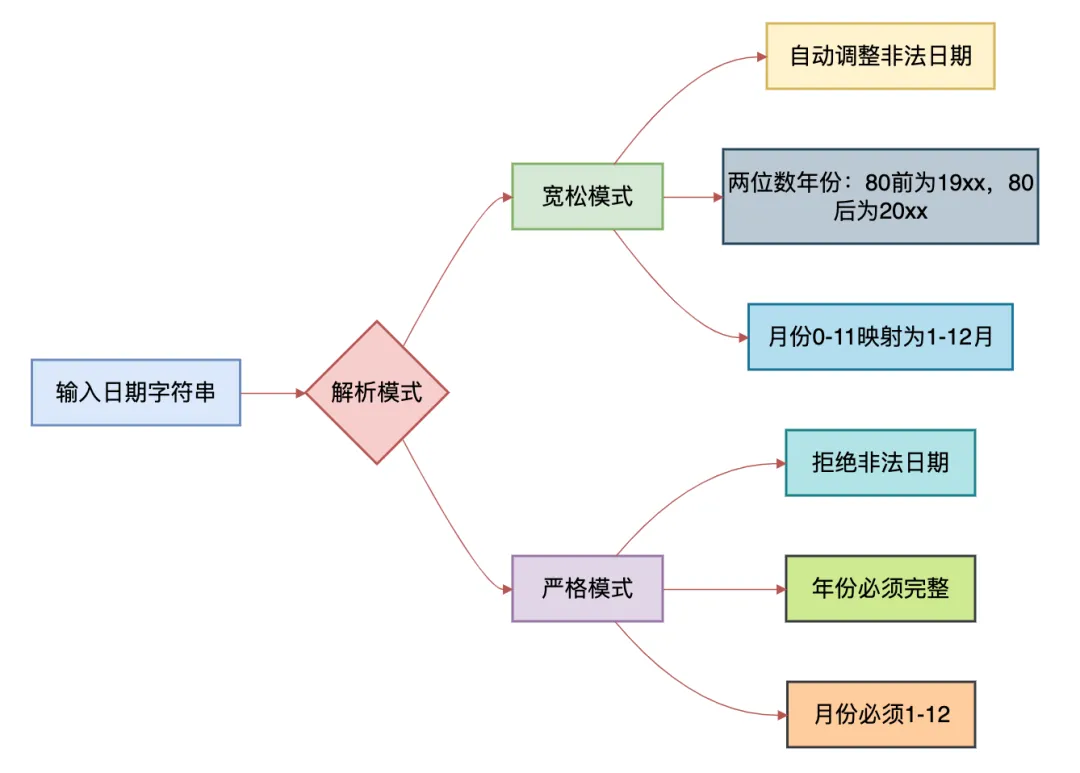
解决方案
public class DateParsingSolution {
    public static void main(String[] args) {
        // 解决方案1:始终使用严格模式
        SimpleDateFormat sdf = new SimpleDateFormat("yyyy-MM-dd");
        sdf.setLenient(false);

        // 解决方案2:使用Java 8的DateTimeFormatter
        DateTimeFormatter formatter = DateTimeFormatter.ofPattern("yyyy-MM-dd")
                .withResolverStyle(ResolverStyle.STRICT); // 严格模式

        try {
            LocalDate date = LocalDate.parse("2023-02-28", formatter);
            System.out.println("成功解析: " + date);

            // 尝试解析非法日期
            LocalDate invalid = LocalDate.parse("2023-02-30", formatter);
        } catch (DateTimeParseException e) {
            System.out.println("Java 8严格模式拒绝: " + e.getMessage());
        }

        // 解决方案3:自定义解析器
        DateValidator validator = new DateValidator();

        String[] testDates = {
            "2023-02-28",  // 合法
            "2023-02-29",  // 非法(非闰年)
            "2024-02-29",  // 合法(闰年)
            "2023-13-01",  // 非法月份
            "23-02-01",    // 两位年份
        };

        for (String dateStr : testDates) {
            System.out.println(dateStr + ": " +
                (validator.isValid(dateStr, "yyyy-MM-dd") ? "合法" : "非法"));
        }
    }
}

class DateValidator {
    public boolean isValid(String dateStr, String pattern) {
        SimpleDateFormat sdf = new SimpleDateFormat(pattern);
        sdf.setLenient(false);

        try {
            sdf.parse(dateStr);
            returntrue;
        } catch (ParseException e) {
            returnfalse;
        }
    }
}
8. 序列化坑:时区信息丢失
有些小伙伴在处理分布式系统的日期时间时,可能遇到过序列化后时区信息丢失的问题。
问题重现
public class SerializationTrap {
    public static void main(String[] args) throws IOException, ClassNotFoundException {
        // 创建一个带时区的日期
        Calendar cal = Calendar.getInstance();
        cal.setTimeZone(TimeZone.getTimeZone("America/New_York"));
        cal.set(2023, Calendar.SEPTEMBER, 21, 14, 30, 0);
        Date date = cal.getTime();

        System.out.println("原始日期: " + date);
        System.out.println("时区: " + cal.getTimeZone().getID());

        // 序列化
        ByteArrayOutputStream baos = new ByteArrayOutputStream();
        ObjectOutputStream oos = new ObjectOutputStream(baos);
        oos.writeObject(date);
        oos.close();

        // 反序列化
        ByteArrayInputStream bais = new ByteArrayInputStream(baos.toByteArray());
        ObjectInputStream ois = new ObjectInputStream(bais);
        Date deserializedDate = (Date) ois.readObject();

        System.out.println("\n反序列化后的日期: " + deserializedDate);
        // 问题:时区信息丢失了!

        // 使用不同的时区格式化
        SimpleDateFormat sdfNY = new SimpleDateFormat("yyyy-MM-dd HH:mm:ss z");
        sdfNY.setTimeZone(TimeZone.getTimeZone("America/New_York"));

        SimpleDateFormat sdfSH = new SimpleDateFormat("yyyy-MM-dd HH:mm:ss z");
        sdfSH.setTimeZone(TimeZone.getTimeZone("Asia/Shanghai"));

        System.out.println("\n同一时间戳在不同时区的显示:");
        System.out.println("纽约时间: " + sdfNY.format(deserializedDate));
        System.out.println("上海时间: " + sdfSH.format(deserializedDate));
    }
}
解决方案
public class SerializationSolution {
    public static void main(String[] args) {
        // 解决方案1:序列化时区信息
        record ZonedDate(long timestamp, String timezoneId)
                implements Serializable {
            public String format() {
                SimpleDateFormat sdf = new SimpleDateFormat("yyyy-MM-dd HH:mm:ss z");
                sdf.setTimeZone(TimeZone.getTimeZone(timezoneId));
                return sdf.format(new Date(timestamp));
            }
        }

        // 解决方案2:使用ISO 8601格式传输
        ZonedDateTime zdt = ZonedDateTime.now(ZoneId.of("Asia/Shanghai"));
        String isoString = zdt.format(DateTimeFormatter.ISO_OFFSET_DATE_TIME);

        System.out.println("ISO 8601格式: " + isoString);
        System.out.println("包含时区信息: " + zdt.getOffset());

        // 解析时保持时区
        ZonedDateTime parsed = ZonedDateTime.parse(isoString);
        System.out.println("解析后时区: " + parsed.getZone());

        // 解决方案3:使用UTC时间戳+时区信息
        System.out.println("\n分布式系统最佳实践:");
        System.out.println("1. 存储:UTC时间戳 + 时区ID");
        System.out.println("2. 传输:ISO 8601格式字符串");
        System.out.println("3. 显示:根据用户时区本地化");

        // 示例:用户配置时区
        String userTimezone = "America/Los_Angeles";
        Instant now = Instant.now();

        ZonedDateTime userTime = now.atZone(ZoneId.of(userTimezone));
        System.out.println("\n用户所在时区时间: " + userTime);
    }
}
总结
通过这8个坑的分析,我们可以总结出一些重要的经验教训:
核心原则
- 明确时区:始终明确处理的是什么时区的时间
- 严格解析:使用严格模式避免非法日期
- 业务导向:根据业务需求选择合适的日期计算方法
- 统一格式:在整个系统中使用统一的日期时间格式
技术选型建议

有些小伙伴可能会觉得日期处理很复杂,但记住这些原则和最佳实践,就能避开大多数坑。
在实际开发中,建议将日期处理逻辑封装成工具类,并进行充分的单元测试。